
KDP Update
1. Overview and Context
This procedure updates the KDP table in the SQL Database.
2. Triggers
The execution of this procedure is usually triggered by
3. Steps to Be Performed
3.1 Download
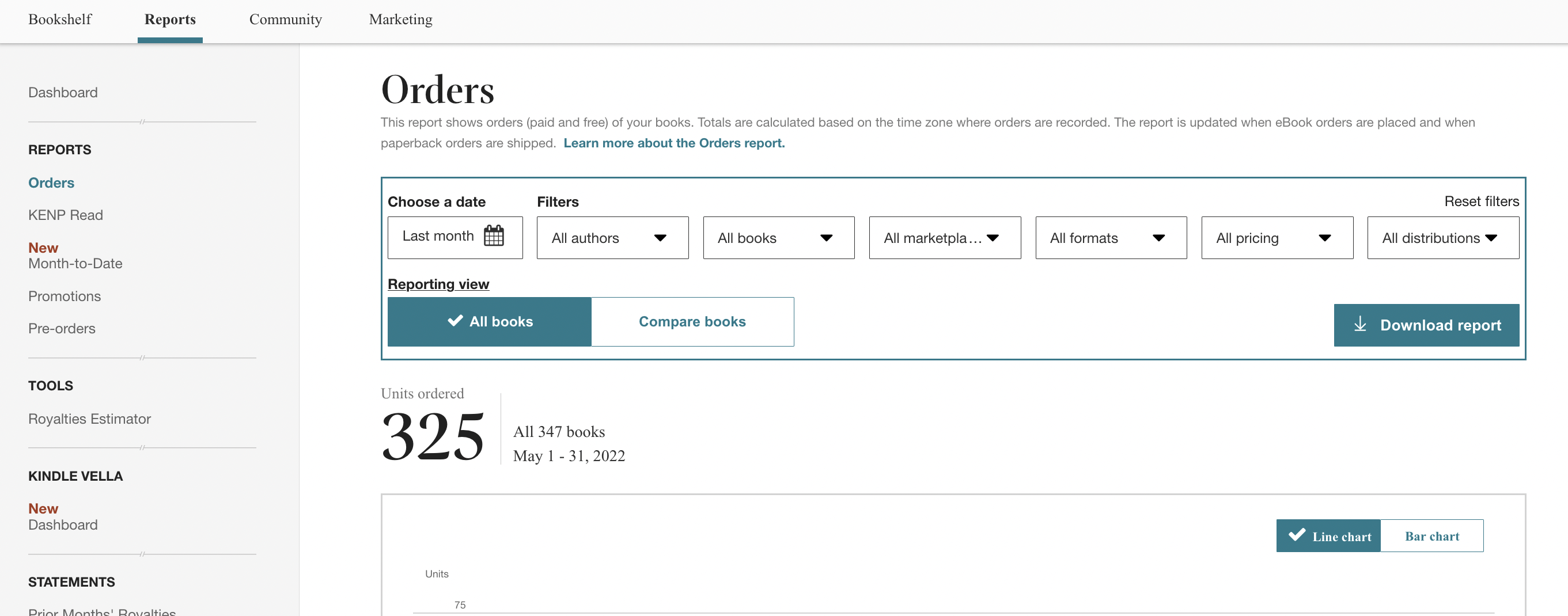
Download the sales data from KDP through its backend. After 90 days, data are no longer downloadable and data entry should be done manually, which is a pain.
- Click "Reports" in the main menu on top
- Select "Orders" from the leftside menu
- Select the appropriate month
- Click "Download Report." KDP delivers XLSX files.
3.2 Clean
- Open in LibreOffice
- Tab "Combined Sales"
- Delete table header
- Save as text CSV, comma-delimited
3.3 Upload
- Navigate to phpMyAdmin table "KDP"
- select Import tab;
- select file
- click "Go."
- archive files under Punctum Admin > Metrics > KDP
4. Additional Information
5. Document Control
| Document ID | PRO-034 |
| Document Owner | Vincent |
| Version | 1.0 |
| Last Date of Change | March 26, 2026 |
| Next Review Due Date | |
| Version & Change Tracking |